

Introduction
Supermarket design is more than placing shelves and products in a store. The way a supermarket is designed can influence how customers move, how long they stay, and how much they buy.
A smart store layout helps guide customers through different areas of the store. When shoppers see more products, they are more likely to buy more items. Good design also makes the store easier to shop in, which improves the overall customer experience.
Supermarket design is also important for daily store operations. Employees need space to restock shelves, organize products, and manage customer traffic. A well-planned layout helps staff work more efficiently while keeping the store clean and organized.
In this article, we will look at key supermarket design ideas and retail layout strategies that can help increase sales and improve the shopping experience.
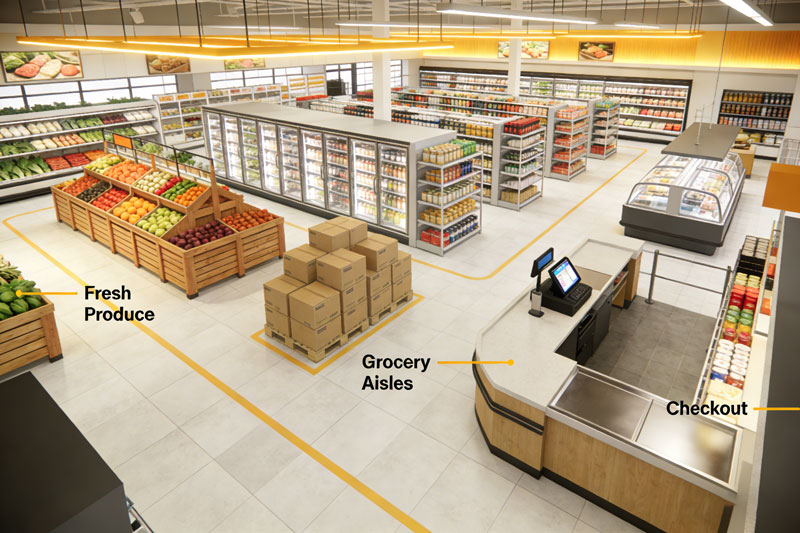
Creating a Customer-Friendly Store Layout
Understanding How Customers Move
A good supermarket layout starts with understanding how customers move through a store.
Most shoppers prefer simple and clear pathways. Wide aisles allow customers to move easily with shopping carts. If aisles are too narrow or confusing, customers may feel uncomfortable and leave faster.
When the store layout encourages customers to walk through many sections, they see more products. This often leads to additional purchases that were not originally planned.
Designing an Attractive Store Entrance
The store entrance is the first thing customers see. It should create a positive first impression.
Many supermarkets place fresh fruits, vegetables, or promotional products near the entrance. These displays add color and make the store look lively and inviting.
The entrance area should also have enough open space. Customers should feel comfortable entering the store without feeling crowded.
Guiding Customers Through the Store
Smart layout design helps guide customers through different sections of the supermarket.
Essential items like milk, bread, or eggs are often placed toward the back of the store. This encourages customers to walk past many aisles before reaching them.
As customers move through the store, they may notice products they did not plan to buy. This strategy helps increase overall sales.
Organizing Product Categories for Easy Shopping
Grouping Similar Products Together
Clear product organization makes shopping easier.
Supermarkets usually divide products into sections such as produce, dairy, frozen food, snacks, beverages, and household items. When similar products are placed together, customers can quickly find what they need.
For example, pasta, pasta sauce, and cooking oil may be placed in the same area. This makes it easier for customers to buy everything they need for a meal.
Keeping Product Locations Consistent
Regular customers become familiar with the store layout over time.
When products stay in the same location, customers can quickly find them. If the store layout changes too often, shoppers may feel confused or frustrated.
Keeping a consistent layout helps create a smoother shopping experience.
Using Clear Signs and Labels
Good signs help customers find products faster.
Large overhead signs can show where different sections are located. Shelf labels help customers identify specific products and prices.
Clear signs reduce confusion and allow customers to focus on choosing products instead of searching for them.
Improving Product Visibility with Smart Displays
Using End Cap Displays
End caps are the displays at the end of store aisles. These areas attract a lot of attention.
Supermarkets often place promotional products or seasonal items in end cap displays. Because customers naturally look toward the end of aisles, these displays can increase product visibility.
Keeping end cap displays neat and well-stocked helps them stay effective.
Placing Products at Eye Level
The position of products on shelves matters.
Items placed at eye level are easier to notice. Many supermarkets place popular or high-margin products in these spots.
Lower shelves may hold larger items, while higher shelves may store less popular products.
Using Lighting to Highlight Products
Lighting can make products look more attractive.
Bright and balanced lighting helps customers clearly see products. In fresh food areas like produce sections, good lighting can make fruits and vegetables look fresher and more appealing.
A well-lit store also feels safer and more welcoming.
Designing Efficient Checkout Areas
Creating Smooth Checkout Flow
Checkout areas should be easy to understand and use.
Clear lines help customers know where to stand while waiting to pay. This prevents confusion and keeps traffic moving smoothly.
Stores should also have enough checkout counters to handle busy shopping hours.
Encouraging Impulse Purchases
Checkout areas are great places for small, quick purchases.
Items like candy, snacks, gum, and drinks are often placed near checkout counters. Customers often pick up these items while waiting in line.
Even though these products are small, they can add a lot to total sales.
Providing a Positive Final Experience
The checkout process is the final step in the shopping experience.
Clean checkout counters, organized displays, and friendly staff can leave customers with a good impression.
A smooth checkout experience makes customers more likely to return.
Using Strong and Flexible Store Fixtures
Installing Durable Shelving
Supermarkets carry many products, including heavy items. Shelving must be strong enough to support these products safely.
Heavy-duty shelving keeps products stable and organized. It also helps prevent accidents and damaged goods.
Strong shelving systems also last longer and require less maintenance.
Choosing Flexible Display Fixtures
Supermarkets often change displays for promotions and seasonal products.
Adjustable shelves and modular displays allow stores to reorganize products quickly. This flexibility helps stores update their layout without major renovations.
Flexible fixtures are useful for keeping the store layout fresh and interesting.
Maintaining a Consistent Store Style
Store fixtures should match the overall store design.
Using similar materials, colors, and styles creates a clean and professional look. A consistent appearance makes the store feel more organized and pleasant.
A well-designed store environment also improves the brand image.
Creating a Comfortable Shopping Environment
Keeping the Store Clean and Organized
Cleanliness is very important in supermarkets.
Customers expect grocery stores to maintain high hygiene standards. Clean floors, tidy shelves, and clear aisles help create trust.
When a store looks clean and organized, customers feel more confident buying food products.
Managing Temperature and Airflow
Supermarkets have many areas with different temperature needs.
Refrigerated and frozen sections must stay cold, but the rest of the store should remain comfortable for customers. Good ventilation helps maintain a pleasant environment.
When customers feel comfortable, they are more likely to spend more time shopping.
Improving the Store Atmosphere
The store atmosphere also affects how customers feel.
Soft background music and comfortable lighting can create a relaxed shopping environment. This encourages customers to move slowly through the store and explore more products.
A pleasant atmosphere can improve the overall shopping experience.
Supporting Efficient Store Operations
Making Restocking Easier
Store layout should also help employees work efficiently.
Staff need clear paths to move products from storage areas to store shelves. Easy access helps employees restock products faster.
Efficient restocking keeps shelves full and attractive.
Improving Inventory Management
Organized product displays make it easier to track inventory.
Employees can quickly see which items are running low and refill them. This helps prevent empty shelves and lost sales.
Well-managed inventory ensures customers can find the products they need.
Reducing Operating Costs
A smart store design can reduce daily operating costs.
Layouts that make cleaning, restocking, and organizing easier require less time and labor. Over time, this helps stores improve overall efficiency and profitability.
Adapting Layouts for Different Store Sizes
Designing Small Grocery Stores
Small grocery stores must use their space carefully.
Compact layouts with clear sections help customers find products quickly. Vertical shelving can also increase the number of products displayed.
Even small stores can feel spacious when the layout is well planned.
Planning Large Supermarkets
Large supermarkets usually have many departments, such as produce, bakery, frozen foods, and household goods.
Dividing the store into clear zones helps customers navigate easily. Wide aisles and open spaces also help manage higher customer traffic.
These features make large stores easier and more comfortable to shop in.
Keeping the Layout Flexible
Retail needs change over time.
Modular fixtures and movable displays allow supermarkets to update layouts for seasonal products, promotions, or new merchandise.
Flexible layouts help keep the store fresh and interesting for returning customers.
Conclusion
Supermarket design plays an important role in improving customer experience and increasing sales.
A well-planned store layout helps guide customers through the store, improves product visibility, and encourages shoppers to explore more sections.
From entrance displays and product organization to checkout areas and store fixtures, every design element affects the shopping experience.
When supermarkets combine smart layout planning, clear product displays, and a comfortable shopping environment, they create stores that customers enjoy visiting.
A well-designed supermarket not only improves shopping convenience but also supports long-term retail success.